Working with streaming IO
Dependency
To use Pekko Streams, add the module to your project:
- sbt
val PekkoVersion = "2.0.0" libraryDependencies += "org.apache.pekko" %% "pekko-stream" % PekkoVersion- Maven
<properties> <scala.binary.version>2.13</scala.binary.version> </properties> <dependencyManagement> <dependencies> <dependency> <groupId>org.apache.pekko</groupId> <artifactId>pekko-bom_${scala.binary.version}</artifactId> <version>2.0.0</version> <type>pom</type> <scope>import</scope> </dependency> </dependencies> </dependencyManagement> <dependencies> <dependency> <groupId>org.apache.pekko</groupId> <artifactId>pekko-stream_${scala.binary.version}</artifactId> </dependency> </dependencies>- Gradle
def versions = [
  ScalaBinary: "2.13"
]
dependencies {
  implementation platform("org.apache.pekko:pekko-bom_${versions.ScalaBinary}:2.0.0")

  implementation "org.apache.pekko:pekko-stream_${versions.ScalaBinary}"
}
Introduction
Pekko Streams provides a way of handling File IO and TCP connections with Streams. While the general approach is very similar to the Actor based TCP handling using Pekko IO, by using Pekko Streams you are freed of having to manually react to back-pressure signals, as the library does it transparently for you.
Streaming TCP
Accepting connections: Echo Server
In order to implement a simple EchoServer we bind to a given address, which returns a SourceSource[IncomingConnectionIncomingConnection, Future[ServerBindingServerBinding]SourceSource<IncomingConnectionIncomingConnection, CompletionStage<ServerBindingServerBinding>>, which will emit an IncomingConnection element for each new connection that the Server should handle:
- Scala
-
source
val binding: Future[ServerBinding] = Tcp(system).bind("127.0.0.1", 8888).to(Sink.ignore).run() binding.map { b => b.unbind().onComplete { case _ => // ... } } - Java
-
source
// IncomingConnection and ServerBinding imported from Tcp final Source<IncomingConnection, CompletionStage<ServerBinding>> connections = Tcp.get(system).bind("127.0.0.1", 8888);
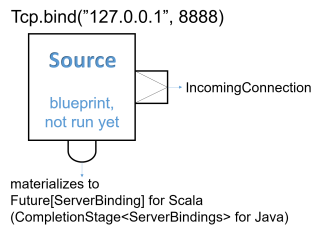
Next, we handle each incoming connection using a FlowFlow which will be used as the operator to handle and emit ByteStringByteString s from and to the TCP Socket. Since one ByteString does not have to necessarily correspond to exactly one line of text (the client might be sending the line in chunks) we use the Framing.delimiterFraming.delimiter helper Flow to chunk the inputs up into actual lines of text. The last argument controls whether an explicit line ending is required for the last message before the connection is closed: allowTruncation = true means that the last message is emitted even without a trailing line endingFramingTruncation.DISALLOW means that an explicit line ending is required even for the last message. In this example we add exclamation marks to each incoming text message and push it through the flow:
- Scala
-
source
import org.apache.pekko.stream.scaladsl.Framing val connections: Source[IncomingConnection, Future[ServerBinding]] = Tcp(system).bind(host, port) connections.runForeach { connection => println(s"New connection from: ${connection.remoteAddress}") val echo = Flow[ByteString] .via(Framing.delimiter(ByteString("\n"), maximumFrameLength = 256, allowTruncation = true)) .map(_.utf8String) .map(_ + "!!!\n") .map(ByteString(_)) connection.handleWith(echo) } - Java
-
source
connections.runForeach( connection -> { System.out.println("New connection from: " + connection.remoteAddress()); final Flow<ByteString, ByteString, NotUsed> echo = Flow.of(ByteString.class) .via( Framing.delimiter( ByteString.fromString("\n"), 256, FramingTruncation.DISALLOW)) .map(ByteString::utf8String) .map(s -> s + "!!!\n") .map(ByteString::fromString); connection.handleWith(echo, system); }, system);
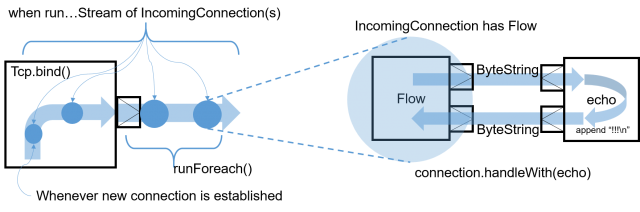
Notice that while most building blocks in Pekko Streams are reusable and freely shareable, this is not the case for the incoming connection Flow, since it directly corresponds to an existing, already accepted connection its handling can only ever be materialized once.
Closing connections is possible by cancelling the incoming connection FlowFlow from your server logic (e.g. by connecting its downstream to a Sink.cancelledSink.cancelled and its upstream to a Source.emptySource.empty. It is also possible to shut down the server’s socket by cancelling the IncomingConnectionIncomingConnection source connections.
We can then test the TCP server by sending data to the TCP Socket using netcat:
$ echo -n "Hello World" | netcat 127.0.0.1 8888
Hello World!!!
Connecting: REPL Client
In this example we implement a rather naive Read Evaluate Print Loop client over TCP. Let’s say we know a server has exposed a simple command line interface over TCP, and would like to interact with it using Pekko Streams over TCP. To open an outgoing connection socket we use the outgoingConnection method:
- Scala
-
source
val connection = Tcp(system).outgoingConnection("127.0.0.1", 8888) val replParser = Flow[String].takeWhile(_ != "q").concat(Source.single("BYE")).map(elem => ByteString(s"$elem\n")) val repl = Flow[ByteString] .via(Framing.delimiter(ByteString("\n"), maximumFrameLength = 256, allowTruncation = true)) .map(_.utf8String) .map(text => println("Server: " + text)) .map(_ => readLine("> ")) .via(replParser) val connected = connection.join(repl).run() - Java
-
source
final Flow<ByteString, ByteString, CompletionStage<OutgoingConnection>> connection = Tcp.get(system).outgoingConnection("127.0.0.1", 8888); final Flow<String, ByteString, NotUsed> replParser = Flow.<String>create() .takeWhile(elem -> !elem.equals("q")) .concat(Source.single("BYE")) // will run after the original flow completes .map(elem -> ByteString.fromString(elem + "\n")); final Flow<ByteString, ByteString, NotUsed> repl = Flow.of(ByteString.class) .via(Framing.delimiter(ByteString.fromString("\n"), 256, FramingTruncation.DISALLOW)) .map(ByteString::utf8String) .map( text -> { System.out.println("Server: " + text); return "next"; }) .map(elem -> readLine("> ")) .via(replParser); CompletionStage<OutgoingConnection> connectionCS = connection.join(repl).run(system);
The repl flow we use to handle the server interaction first prints the servers response, then awaits on input from the command line (this blocking call is used here for the sake of simplicity) and converts it to a ByteStringByteString which is then sent over the wire to the server. Then we connect the TCP pipeline to this operator–at this point it will be materialized and start processing data once the server responds with an initial message.
A resilient REPL client would be more sophisticated than this, for example it should split out the input reading into a separate mapAsync step and have a way to let the server write more data than one ByteString chunk at any given time, these improvements however are left as exercise for the reader.
Avoiding deadlocks and liveness issues in back-pressured cycles
When writing such end-to-end back-pressured systems you may sometimes end up in a situation of a loop, in which either side is waiting for the other one to start the conversation. One does not need to look far to find examples of such back-pressure loops. In the two examples shown previously, we always assumed that the side we are connecting to would start the conversation, which effectively means both sides are back-pressured and can not get the conversation started. There are multiple ways of dealing with this which are explained in depth in Graph cycles, liveness and deadlocks, however in client-server scenarios it is often the simplest to make either side send an initial message.
In case of back-pressured cycles (which can occur even between different systems) sometimes you have to decide which of the sides has to start the conversation in order to kick it off. This can be often done by injecting an initial message from one of the sides–a conversation starter.
To break this back-pressure cycle we need to inject some initial message, a “conversation starter”. First, we need to decide which side of the connection should remain passive and which active. Thankfully in most situations finding the right spot to start the conversation is rather simple, as it often is inherent to the protocol we are trying to implement using Streams. In chat-like applications, which our examples resemble, it makes sense to make the Server initiate the conversation by emitting a “hello” message:
- Scala
-
source
connections .to(Sink.foreach { connection => // server logic, parses incoming commands val commandParser = Flow[String].takeWhile(_ != "BYE").map(_ + "!") import connection._ val welcomeMsg = s"Welcome to: $localAddress, you are: $remoteAddress!" val welcome = Source.single(welcomeMsg) val serverLogic = Flow[ByteString] .via(Framing.delimiter(ByteString("\n"), maximumFrameLength = 256, allowTruncation = true)) .map(_.utf8String) .via(commandParser) // merge in the initial banner after parser .merge(welcome) .map(_ + "\n") .map(ByteString(_)) connection.handleWith(serverLogic) }) .run() - Java
-
source
connections .to( Sink.foreach( (IncomingConnection connection) -> { // server logic, parses incoming commands final Flow<String, String, NotUsed> commandParser = Flow.<String>create() .takeWhile(elem -> !elem.equals("BYE")) .map(elem -> elem + "!"); final String welcomeMsg = "Welcome to: " + connection.localAddress() + " you are: " + connection.remoteAddress() + "!"; final Source<String, NotUsed> welcome = Source.single(welcomeMsg); final Flow<ByteString, ByteString, NotUsed> serverLogic = Flow.of(ByteString.class) .via( Framing.delimiter( ByteString.fromString("\n"), 256, FramingTruncation.DISALLOW)) .map(ByteString::utf8String) .via(commandParser) .merge(welcome) .map(s -> s + "\n") .map(ByteString::fromString); connection.handleWith(serverLogic, system); })) .run(system);
To emit the initial message we merge a SourceSource with a single element, after the command processing but before the framing and transformation to ByteStringByteString s this way we do not have to repeat such logic.
In this example both client and server may need to close the stream based on a parsed command - BYE in the case of the server, and q in the case of the client. This is implemented by taking from the stream until q and concatenating a Source with a single BYE element which will then be sent after the original source completedusing a custom operator extending GraphStage which completes the stream once it encounters such command.
Using framing in your protocol
Streaming transport protocols like TCP only pass streams of bytes, and does not know what is a logical chunk of bytes from the application’s point of view. Often when implementing network protocols you will want to introduce your own framing. This can be done in two ways: An end-of-frame marker, e.g. end line \n, can do framing via Framing.delimiterFraming.delimiter. Or a length-field can be used to build a framing protocol. There is a bidi implementing this protocol provided by Framing.simpleFramingProtocolFraming.simpleFramingProtocol.
JsonFramingJsonFraming separates valid JSON objects from incoming ByteStringByteString objects:
- Scala
-
source
val input = """ |[ | { "name" : "john" }, | { "name" : "Ég get etið gler án þess að meiða mig" }, | { "name" : "jack" }, |] |""".stripMargin // also should complete once notices end of array val result = Source.single(ByteString(input)).via(JsonFraming.objectScanner(64)).runFold(Seq.empty[String]) { case (acc, entry) => acc ++ Seq(entry.utf8String) } - Java
-
source
String input = "[{ \"name\" : \"john\" }, { \"name\" : \"Ég get etið gler án þess að meiða mig\" }, {" + " \"name\" : \"jack\" }]"; CompletionStage<ArrayList<String>> result = Source.single(ByteString.fromString(input)) .via(JsonFraming.objectScanner(Integer.MAX_VALUE)) .runFold( new ArrayList<String>(), (acc, entry) -> { acc.add(entry.utf8String()); return acc; }, system);
TLS
Similar factories as shown above for raw TCP but where the data is encrypted using TLS are available from Tcp through outgoingConnectionWithTls, bindWithTls and bindAndHandleWithTls, see the `Tcp Scaladoc``Tcp Javadoc` for details.
When using pekko.stream.materializer.tls.engine = graph-stage, TLS packet buffers are sized to the requirements of the SSLEngine. The pekko.io.tcp.direct-buffer-size setting controls the size of reusable TCP buffers; it does not limit the TLS record size. If a TLS buffer needs more space than the TCP pool provides, the TLS stage uses heap buffers for that connection, initially sharing one allocation between its three transport buffers. Packet buffers grow if session requirements increase, preserving pending ciphertext. After a handshake reduces the required output capacity, the stage shrinks its output buffer once pending ciphertext has been sent, returning to a pooled buffer when it fits. A capacity required by an empty-buffer overflow is retained until the next handshake to avoid repeated allocation. Heap fallback buffers are never returned to the shared TCP pool. Small transport buffers can restrict plaintext batches to one TLS record per engine call; batch limits are recalculated from the actual output capacity as it grows. Measure allocation and throughput for your workload before tuning this setting.
Using TLS requires a keystore and a truststore and then a somewhat involved dance of configuring the SSLEngine and the details for how the session should be negotiated:
- Scala
-
source
import java.security.KeyStore import javax.net.ssl.KeyManagerFactory import javax.net.ssl.SSLContext import javax.net.ssl.SSLEngine import javax.net.ssl.TrustManagerFactory import org.apache.pekko.stream.TLSRole // initialize SSLContext once lazy val sslContext: SSLContext = { // Don't hardcode your password in actual code val password = "abcdef".toCharArray // trust store and keys in one keystore val keyStore = KeyStore.getInstance("PKCS12") // KeyStore.load does not close the stream it is given val keyStoreStream = getClass.getResourceAsStream("/tcp-spec-keystore.p12") try keyStore.load(keyStoreStream, password) finally if (keyStoreStream ne null) keyStoreStream.close() val trustManagerFactory = TrustManagerFactory.getInstance("SunX509") trustManagerFactory.init(keyStore) val keyManagerFactory = KeyManagerFactory.getInstance("SunX509") keyManagerFactory.init(keyStore, password) // init ssl context val context = SSLContext.getInstance("TLSv1.3") context.init(keyManagerFactory.getKeyManagers, trustManagerFactory.getTrustManagers, new SecureRandom) context } // create new SSLEngine from the SSLContext, which was initialized once def createSSLEngine(role: TLSRole): SSLEngine = { val engine = sslContext.createSSLEngine() engine.setUseClientMode(role == pekko.stream.Client) engine.setEnabledCipherSuites(Array("TLS_AES_256_GCM_SHA384")) engine.setEnabledProtocols(Array("TLSv1.3")) engine } - Java
-
source
// imports import java.security.KeyStore; import java.security.SecureRandom; import javax.net.ssl.KeyManagerFactory; import javax.net.ssl.SSLContext; import javax.net.ssl.SSLEngine; import javax.net.ssl.TrustManagerFactory; import org.apache.pekko.stream.TLSRole; // initialize SSLContext once private final SSLContext sslContext; { try { // Don't hardcode your password in actual code char[] password = "abcdef".toCharArray(); // trust store and keys in one keystore KeyStore keyStore = KeyStore.getInstance("PKCS12"); keyStore.load(getClass().getResourceAsStream("/tcp-spec-keystore.p12"), password); TrustManagerFactory trustManagerFactory = TrustManagerFactory.getInstance("SunX509"); trustManagerFactory.init(keyStore); KeyManagerFactory keyManagerFactory = KeyManagerFactory.getInstance("SunX509"); keyManagerFactory.init(keyStore, password); // init ssl context SSLContext context = SSLContext.getInstance("TLSv1.3"); context.init( keyManagerFactory.getKeyManagers(), trustManagerFactory.getTrustManagers(), new SecureRandom()); sslContext = context; } catch (KeyStoreException | IOException | NoSuchAlgorithmException | CertificateException | UnrecoverableKeyException | KeyManagementException e) { throw new RuntimeException(e); } } // create new SSLEngine from the SSLContext, which was initialized once public SSLEngine createSSLEngine(TLSRole role) { SSLEngine engine = sslContext.createSSLEngine(); engine.setUseClientMode(role.equals(org.apache.pekko.stream.TLSRole.client())); engine.setEnabledCipherSuites(new String[] {"TLS_DHE_RSA_WITH_AES_256_GCM_SHA384"}); engine.setEnabledProtocols(new String[] {"TLSv1.2"}); return engine; }
The SSLEngine instance can then be used with the binding or outgoing connection factory methods.
The GraphStage TLS engine keeps an asynchronous boundary around TLS processing. It sends element messages across that boundary without sender-side batching, preserving their order relative to a later plaintext-output cancellation from the same handler. This orders boundary messages; it does not drain elements still buffered in other operators or change TLS closing policies.
TLS closing policies
The closing parameter of TLSTLS controls how plaintext-input completion and plaintext-output cancellation close the connection; see TLSClosingTLSClosing. When cancellation closes the connection, bytes not yet accepted by the operator may be discarded. With pekko.stream.materializer.tls.engine = graph-stage, the operator stops further plaintext input and attempts to send data already accepted for the established session, subject to transport availability. This includes up to 64 queued messages plus plaintext already buffered for wrapping. Message sizes are unbounded, so termination can be delayed until that data is sent. Data queued after a renegotiation request is discarded, and draining stops if a new handshake is required. A TLS 1.3 post-handshake message such as a KeyUpdate is not a new handshake, so the response is sent and draining continues; in TLS 1.2 any further handshake stops the drain. Cancellation during a handshake or a transport failure can still prevent delivery. The default legacy-actor engine discards accepted plaintext on cancellation. Use the IgnoreCancel closing policy (TLSClosing.ignoreCancel() in Java) if the handler needs to continue producing a response after it stops reading.
The GraphStage drain also applies when plaintext-output cancellation is observed before the peer’s transport input completes. If transport-input completion is observed first, the existing inbound-close contract applies and accepted plaintext is discarded, matching the legacy actor engine. The drain also continues after a TLS 1.3 peer sends close_notify, because that only closes the peer’s sending direction. A TLS 1.2 close_notify closes both directions of the SSLEngine, so it ends the drain and accepted plaintext that has not been sent is discarded.
Unless a clean shutdown is already waiting for the peer’s reply, cancelling the transport output ends the session, because nothing more can be sent to the peer. That teardown is not silent: once the session is established, the operator still delivers the inbound data it can decrypt in the round that observes the cancellation, and then reports SessionTruncated before the plaintext output completes if the peer’s close_notify has not been processed. This also applies with no buffered inbound records and during renegotiation of an established session: truncation means that a clean peer shutdown was not observed, rather than proof that application bytes were lost. Inbound records still buffered beyond that round are discarded. The operator does not wait for more ciphertext to complete a partial TLS record: cancellation can discard fragments still in flight, and the truncation signal makes that abandonment observable. An already pending plaintext element is delivered before the signal. A plaintext output that is already closed, or a session cancelled before its initial handshake finished, completes without that signal. The transport-output cancellation itself does not call SSLEngine.closeInbound() or invalidate the established SSLSession. If transport input has already completed and is depleted, the cancellation path skips the final inbound round and reports truncation directly.
If the operator has already sent its own close_notify and is waiting for the peer’s reply, transport-output cancellation preserves that existing wait while the plaintext output is open. If the local close_notify is still buffered inside the operator, cancellation discards it and follows the truncation behavior above instead of waiting for the peer’s reply. Cancelling the plaintext output as well ends the wait. An operator still flushing outbound data cannot continue sending after transport-output cancellation.
The truncation signal obeys plaintext backpressure. The plaintext input is cancelled immediately when the transport output is cancelled, even if the final inbound round is waiting for plaintext demand. The transport input is cancelled after that round; the operator then stays alive until the signal is consumed or the plaintext output is cancelled. Applications that stop reading must cancel that output as well; applications requiring a time bound can apply completionTimeout to the plaintext stream. Consumers using the TLS BidiFlow directly must handle SessionTruncated explicitly rather than using a partial map that only matches SessionBytes. The Scala and Java Tcp.bindWithTls and Tcp.outgoingConnectionWithTls APIs expose ByteString streams and filter out this signal.
Streaming File IO
Pekko Streams provide simple Sources and Sinks that can work with ByteStringByteString instances to perform IO operations on files.
Streaming data from a file is as easy as creating a FileIO.fromPath given a target path, and an optional chunkSize which determines the buffer size determined as one “element” in such stream:
- Scala
-
source
import org.apache.pekko.stream.scaladsl._ val file = Paths.get("example.csv") val foreach: Future[IOResult] = FileIO.fromPath(file).to(Sink.ignore).run() - Java
-
source
final Path file = Paths.get("example.csv"); Sink<ByteString, CompletionStage<Done>> printlnSink = Sink.<ByteString>foreach(chunk -> System.out.println(chunk.utf8String())); CompletionStage<IOResult> ioResult = FileIO.fromPath(file).to(printlnSink).run(system);
Please note that these operators are backed by Actors and by default are configured to run on a pre-configured threadpool-backed dispatcher dedicated for File IO. This is very important as it isolates the blocking file IO operations from the rest of the ActorSystem allowing each dispatcher to be utilised in the most efficient way. If you want to configure a custom dispatcher for file IO operations globally, you can do so by changing the pekko.stream.materializer.blocking-io-dispatcher, or for a specific operator by specifying a custom Dispatcher in code, like this: